
What is Mesh Wi-Fi? A Strategic Guide for Australian Businesses in 2026
Updated: Mar 24
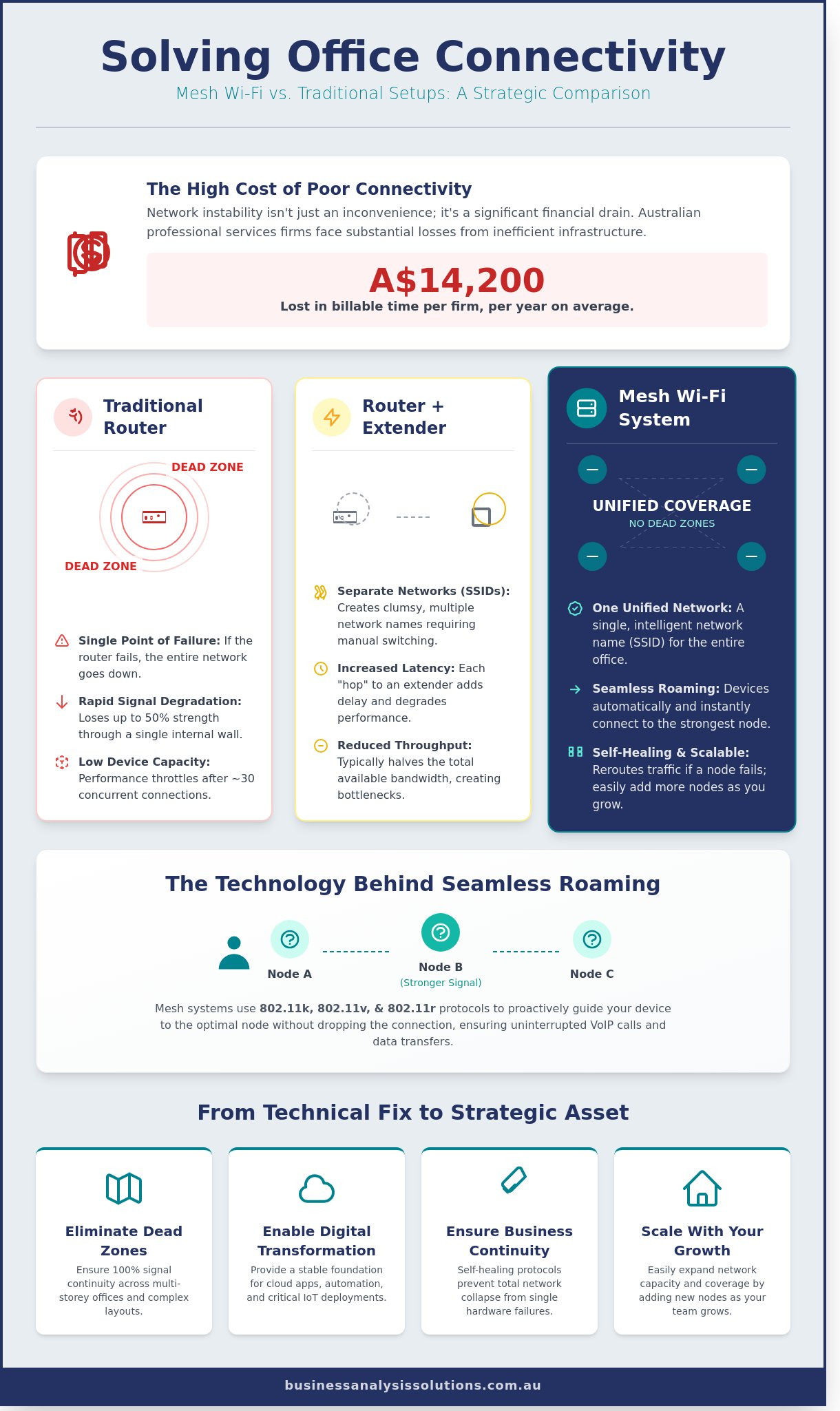
In 2026, a single dropped video call during a high-stakes stakeholder engagement represents more than a technical glitch; it's a direct threat to professional credibility. Data suggests that network instability costs Australian professional services firms an average of A$14,200 per year in lost billable time. Most leaders recognize that inconsistent coverage across multi-storey offices is no longer a minor inconvenience. It's a strategic bottleneck that stifles digital efficiency. You're likely evaluating what is mesh wifi to determine if it can finally resolve the connectivity dead zones that impact your team's daily output.
We agree that your ICT infrastructure should be a silent enabler of growth, not a source of frustration. This guide reveals how mesh Wi-Fi technology provides the stable foundation required for modern digital transformation by creating a unified network fabric. You'll discover the specific ROI of migrating to professional-grade hardware and gain a clear path to implementing a system that guarantees seamless, office-wide connectivity. We'll move from high-level strategic requirements to the granular details of deployment to ensure your investment delivers tangible value.
Key Takeaways
Gain a clear understanding of what is mesh wifi and how transitioning from a traditional single-router model to a unified node system eliminates connectivity dead zones.
Discover the technical advantages of seamless roaming and single SSID integration, ensuring uninterrupted connectivity as personnel move across complex organizational environments.
Evaluate the performance gap between mesh systems and traditional extenders to mitigate latency issues and preserve total network throughput for high-demand operations.
Master a methodical implementation strategy tailored for the Australian market, from conducting precise site surveys to ensuring full compatibility with specific NBN connection types.
Align your network infrastructure with your broader digital transformation blueprint to provide the necessary stability for scalable automation and critical IoT deployments.
Table of Contents Understanding Mesh Wi-Fi: Beyond the Standard Router How Mesh Networks Function: Nodes, Backhaul, and Seamless Roaming Mesh Wi-Fi vs. Traditional Extenders: A Performance Analysis Implementing Mesh Wi-Fi in an Australian Business Environment Aligning Connectivity with Your Digital Transformation Blueprint
Understanding Mesh Wi-Fi: Beyond the Standard Router
Standard networking relies on a central hub to distribute data. This model creates a single point of failure and often leads to inconsistent performance across a professional environment. When you ask what is mesh wifi, you're looking at a decentralized architecture where multiple nodes communicate as a single, unified system. This Wireless Mesh Network replaces the outdated single-point access model with a coordinated ecosystem of devices. Unlike traditional extenders that create separate network IDs, a mesh system maintains a single SSID across the entire premises. This ensures 100% signal continuity as staff move between meeting rooms and workstations without experiencing drops in connectivity.
The primary goal of this technology is the total elimination of dead zones and signal degradation. In a standard setup, signal strength often degrades by 50% after passing through a single internal brick wall. Mesh systems solve this by creating a fabric of coverage. They utilize a Self-Healing Network protocol to maintain business continuity. If a specific node loses power or experiences localized interference, the system automatically reroutes data through the remaining active nodes. This logic prevents the total connectivity collapses common in linear network setups, ensuring that critical business processes remain online regardless of individual hardware hiccups.
The Core Components: Routers vs. Nodes
The primary mesh router connects directly to your NBN connection point via an Ethernet cable. It acts as the strategic gateway for the entire system. Satellite nodes then distribute this signal throughout the office. For maximum efficiency, place nodes every 10 to 12 metres. Strategic placement ensures data packets take the most efficient path, reducing latency for the 40 or more devices typically found in a modern Australian professional suite. This structured approach moves beyond simple coverage to focus on high-speed throughput and reliability.
Why Traditional Wi-Fi Fails in Growing Businesses
Traditional Wi-Fi faces physical and logical limitations that hinder growth. Signal strength drops significantly over square footage; routers often struggle once a device moves 15 metres from the source. Concrete walls, glass partitions, and even electronic interference from office appliances create physical obstructions that a single router cannot penetrate effectively. Furthermore, capacity limits represent a major hurdle. Most standard routers begin to throttle performance once they reach 30 concurrent connections. Modern offices often exceed this limit within the first year of operation, leading to a 40% drop in throughput during peak hours. To understand what is mesh wifi in a professional context, you must view it as a solution to these specific scalability and interference challenges.
Mesh systems represent a shift from reactive troubleshooting to proactive infrastructure management. By deploying a system that grows with the organization, business leaders ensure that their digital foundations remain robust. This architecture supports high-density device environments and provides the stable environment necessary for cloud-based operations and real-time collaboration. It's a calculated move toward operational excellence that prioritizes long-term stability over short-term fixes.
How Mesh Networks Function: Nodes, Backhaul, and Seamless Roaming
Understanding what is mesh wifi requires looking past the physical hardware to the software logic that governs the system. Unlike traditional routers that broadcast from a single point, a mesh network operates as a unified ecosystem. The primary operational advantage is the Single Service Set Identifier (SSID). In a standard office environment, moving between floors often forces a device to disconnect from one router and authenticate with a range extender. Mesh systems eliminate this friction. Your device sees one single network name, regardless of how many nodes are distributed across the site.
This continuity relies on seamless roaming protocols, specifically the 802.11k, 802.11v, and 802.11r standards. These protocols allow the network to proactively manage device transitions. When a staff member moves during a VoIP call, the network identifies the strongest node and completes the handoff in less than 100 milliseconds. This speed prevents packet loss and dropped connections. To understand the broader context of these configurations, you can find everything you need to know about Wi-Fi systems through detailed technical comparisons.
Data efficiency is further maintained through dynamic path selection. The mesh controller constantly evaluates the signal strength and congestion levels of every possible path between nodes. If a specific node experiences a localized surge in traffic or environmental interference, the system automatically reroutes data through an alternative node. This self-healing architecture ensures that internal what is mesh wifi deployments remain resilient even when individual components face high demand.
The Importance of Backhaul: Wired vs. Wireless
Backhaul acts as the dedicated internal highway that nodes use to communicate with the primary gateway. Wireless backhaul is a pragmatic choice for Australian businesses operating in leased offices where drilling for cables is prohibited. It allows for rapid deployment and flexibility. However, ethernet backhaul remains the gold standard for ICT stability. Hardwiring nodes via Cat6a cabling ensures a dedicated 10Gbps link, freeing up all wireless frequencies for client devices. High-performance systems often utilize tri-band technology, which sets aside a specific 5GHz band exclusively for node-to-node communication to prevent throughput degradation.
Intelligent Load Balancing
Mesh systems use automated logic to distribute devices across the 2.4GHz and 5GHz bands based on real-time requirements. High-bandwidth tasks like 4K video conferencing or large cloud backups are pushed to the faster 5GHz band; meanwhile, low-power IoT sensors are relegated to the 2.4GHz band to preserve capacity. Load balancing serves as a critical tool for operational efficiency by distributing network traffic across all available resources to prevent any single node from becoming a bottleneck. For organisations looking to scale their digital infrastructure, implementing a structured connectivity strategy ensures these technical features translate into measurable productivity gains. This intelligent management allows the network to support dozens of concurrent users without the latency spikes common in traditional router-and-extender setups.
Mesh Wi-Fi vs. Traditional Extenders: A Performance Analysis
Understanding what is mesh wifi requires a direct comparison with the legacy hardware it replaces. Traditional range extenders function as simple repeaters. They capture an existing signal and rebroadcast it, which creates a significant bottleneck. Because most extenders use a single radio to receive and transmit data simultaneously, they immediately halve the available throughput. In a standard 100 Mbps NBN environment, an extender often delivers less than 45 Mbps to the end user. Mesh systems eliminate this through a dedicated backhaul. By using a separate frequency for inter-node communication, mesh networks maintain high speeds across the entire premises.
The "sticky client" problem remains the most common frustration with cheap extenders. When you move through a building, your smartphone often clings to the main router signal even when it's too weak to function. You're forced to manually toggle Wi-Fi off and on to connect to the extender. Mesh networks solve this using 802.11k, v, and r protocols. These standards manage the hand-off between nodes in less than 100 milliseconds. For those seeking a comprehensive guide to Mesh WiFi, the technical distinction lies in how the network handles traffic routing. Instead of multiple disparate access points, a mesh system acts as a single, intelligent entity.
Management overhead is another critical differentiator for Australian business owners. Managing three separate extenders means dealing with three different IP addresses and potentially three different web interfaces. If one fails, identifying the fault takes time. Mesh systems utilize unified applications. You can monitor the health of every node, run speed tests, and manage guest access from a single dashboard. This centralized approach extends to security. Standalone extenders are notorious for unpatched vulnerabilities. Mesh systems typically push automated, encrypted firmware updates across all nodes simultaneously, ensuring the entire perimeter stays secure against emerging threats.
Cost vs. Value: The Long-term ICT Perspective
An entry-level mesh 3-pack costs between A$300 and A$600, while a high-performance Wi-Fi 6E system can exceed A$1,500. This is significantly higher than a A$70 plug-in extender. However, the true calculation must include the cost of downtime. If an employee loses 15 minutes of daily productivity due to signal drops or slow reconnects, that totals over 60 hours of lost time per year. Mesh systems offer superior scalability. You can add a new node to a warehouse or home office in minutes without reconfiguring the entire network. The investment pays for itself through reliability and reduced technical debt.
When is a Mesh Network Overkill?
Mesh isn't always the right solution. In a 50-square-metre studio apartment, a single high-end router provides more than enough coverage. Small environments don't benefit from multiple nodes; in fact, placing nodes too close together can cause signal interference. Budget-constrained setups with only two or three low-bandwidth devices might also find the cost of what is mesh wifi hardware hard to justify. If your floor plan is open and you have a clear line of sight, a traditional router is often the most efficient choice. However, as soon as your device count grows or your business expands into a multi-room layout, the transition to mesh becomes a logical necessity for maintaining operational standards.
Implementing Mesh Wi-Fi in an Australian Business Environment
Transitioning from a legacy router to a distributed network requires a structured methodology to ensure a measurable return on investment. For an Australian SME, understanding what is mesh wifi involves more than just purchasing a retail kit; it requires aligning hardware capabilities with specific operational requirements and local infrastructure constraints. A haphazard deployment often results in signal interference that can degrade network performance by up to 40% during peak usage hours.
The implementation process follows five critical phases designed to eliminate connectivity gaps:
Step 1: Conduct a site survey. Use a professional Wi-Fi analyzer to map signal strength (RSSI) across the floor plan. Identifying dead zones where signal drops below -70 dBm is essential for maintaining VoIP stability and video conferencing quality.
Step 2: Verify NBN infrastructure. A business on a 250/100 Mbps FTTP plan requires a mesh system that won't bottleneck the incoming fibre speeds. Check if your current modem-router supports "Bridge Mode" to avoid Double NAT issues that disrupt VPN connections.
Step 3: Calculate node density. As a baseline, plan for one node per 140 to 180 square metres. A 500m² open-plan office in a high-density area like the Perth CBD requires at least four nodes to maintain a consistent 5GHz backhaul amidst surrounding interference.
Step 4: Optimize physical placement. Avoid placing nodes inside metal server racks or behind reinforced concrete pillars. Masonry walls common in older Australian commercial buildings can reduce signal strength by 12dB to 20dB per barrier.
Step 5: Establish logical separation. Configure the network to isolate IoT devices and guest traffic from the primary corporate data stream.
Optimizing the physical environment goes beyond just node placement. Just as you would address structural barriers for Wi-Fi, maintaining the professional appearance of your premises is key. This can range from a fresh coat of paint from services like Performance Painting to installing modern window coverings from specialists like Aussie Online Blinds, ensuring the space reflects the same high standards as your new IT infrastructure.
NBN Compatibility and Hardware Selection
Your NBN connection type dictates your hardware requirements. FTTP users can connect a mesh primary node directly to the NBN Connection Box; however, FTTN users must typically retain their VDSL modem. It's vital to ensure your chosen hardware supports the 802.11ax (Wi-Fi 6) standard to future-proof against the A$1.5 billion NBN upgrade program currently expanding fibre access. Integrating nodes with existing Cat6a cabling via Ethernet backhaul can increase internal data transfer speeds by 35% compared to wireless-only links. This creates a more stable foundation for high-bandwidth applications and large file transfers.
Security Considerations for Professional Networks
Security is a continuous process, not a one-time configuration. WPA3 encryption is now the mandatory standard for protecting sensitive client data against sophisticated brute-force attacks. Professional-grade mesh systems allow for VLAN tagging, which ensures a compromised guest device cannot lateralize into your primary accounting or file server. Since 2022, security vulnerabilities in unpatched networking hardware have risen by 25% globally. This makes automatic firmware updates a non-negotiable requirement for business continuity. Relying on manual updates creates a window of vulnerability that most modern enterprises cannot afford to risk.
Successful deployment hinges on bridging the gap between technical specifications and actual business utility. When your current setup fails to deliver reliable coverage, it's time to optimise your network infrastructure for peak performance.
Aligning Connectivity with Your Digital Transformation Blueprint
Digital transformation often focuses on high-level software architecture or cloud migration, yet the entire structure rests on the "last mile" of connectivity. Without a stable wireless fabric, even the most sophisticated ERP system becomes a liability. Understanding what is mesh wifi is no longer just a technical requirement for IT departments; it's a strategic necessity for business leaders. In 2024, Australian enterprises are increasingly deploying IoT sensors and automated systems that require 99.9% network uptime to function effectively. A mesh network provides the redundant, high-capacity coverage needed to support these devices across expansive floor plans without the signal degradation typical of traditional extenders.
Reliable connectivity serves as the foundation for effective stakeholder engagement. When executive teams or external partners experience latency during critical virtual briefings, it erodes professional confidence and disrupts the flow of information. Strategic alignment relies on the seamless exchange of data. If your network fails during a requirements elicitation session, you lose more than just time; you lose the momentum required to drive organisational change. High-performance wireless systems ensure that every participant remains connected to the objective, regardless of their physical location within the facility.
Positioning robust connectivity as a prerequisite for a Business Efficiency Diagnostic allows firms to identify the root causes of operational friction. We often see organisations attempt to solve productivity issues with software training when the actual culprit is a fragmented network. Stabilising the hardware environment is the first logical step in any methodical approach to business optimisation. It creates a controlled environment where we can accurately measure process performance without the "noise" of technical instability.
However, technical stability is only one side of the coin. A truly optimised business also addresses the human element, particularly the impact of workplace stress on productivity and focus. Just as a self-healing network maintains digital uptime, supporting employee well-being ensures human resilience. For leaders interested in this holistic approach to business health, wellness centres like the Battersea Park Clinic in London offer therapies designed to manage stress and enhance professional performance, providing a useful model for corporate wellness initiatives worldwide.
The Link Between Connectivity and Process Mapping
Process mapping identifies how value flows through an organisation. When we map these workflows, we often find that slow networks create invisible bottlenecks. For instance, a 3-second delay in data synchronisation for Microsoft 365 applications can aggregate into 40 hours of lost productivity per employee annually. A Fractional CIO conducting a strategic audit will prioritise network stability because software performance is capped by the hardware delivering it. If your wireless infrastructure can't handle peak loads during a 9:00 AM login surge, your digital tools won't deliver the expected return on investment. Ensuring your network can handle the throughput of cloud-based suites is essential for maintaining a competitive edge in the Australian market.
Next Steps: From Connectivity to Full Optimisation
Moving beyond hardware requires a shift toward strategic business analysis. While knowing what is mesh wifi solves the immediate problem of dead zones, it doesn't address the underlying logic of your business processes. Business Analysis & Solutions bridges the gap between technical requirements and commercial objectives. We look past the routers to see how data moves between departments and where manual interventions can be replaced by automated solutions. This structured approach ensures that your ICT environment isn't just functional, but is actively contributing to your bottom line. Once your connectivity is stabilised, you can begin the work of deep-tier optimisation.
Ready to move beyond basic troubleshooting? Request a Business Efficiency Diagnostic to optimise your ICT environment and ensure your technology aligns with your long-term strategic goals.
Future-Proofing Your Australian Business Connectivity
Understanding what is mesh wifi is no longer a technical curiosity; it's a 2026 business imperative. Standard extenders often result in a 50% loss of throughput, but a mesh network maintains 100% signal integrity across its entire footprint. By deploying a system of interconnected nodes, your organisation secures a self-healing environment that supports seamless roaming and high-density data requirements. This transition isn't just about hardware; it's a strategic move to align your digital infrastructure with long-term commercial goals.
Business Analysis & Solutions brings over 20 years of industry experience to help you navigate these complex ICT decisions. We specialise in bridging the gap between technical requirements and business objectives, applying a logical, methodical approach to every project. Our focus remains on delivering clarity and measurable performance rather than temporary patches. You'll work with a partner dedicated to untangling organisational complexities through structured, results-driven strategies.
We're ready to help you build a more resilient and efficient future.
Frequently Asked Questions
Does mesh Wi-Fi replace my current NBN modem?
Mesh Wi-Fi doesn't replace your NBN connection box or modem; it replaces the routing function to distribute signal more effectively. You'll connect the primary mesh node to your NBN Network Termination Device (NTD) via an Ethernet cable. This configuration ensures that your internet signal is distributed evenly across your premises rather than originating from a single, often poorly positioned, hardware point.
How many mesh nodes do I need for a 200sqm office?
A 200sqm office typically requires 2 to 3 mesh nodes to ensure total coverage and eliminate dead zones. For a standard open-plan layout, one primary node and one satellite node provide sufficient overlap. If your office includes internal concrete walls or heavy steel shelving, adding a third node maintains a consistent 5GHz signal throughout the entire floorplan.
Is mesh Wi-Fi better than a long Ethernet cable for my desk?
A physical Ethernet cable remains superior to any wireless connection for latency and absolute reliability. While understanding what is mesh wifi helps optimize mobile devices, a Cat6 cable delivers a dedicated 1Gbps or 10Gbps link without environmental interference. Use mesh for mobility and reserve wired connections for fixed workstations where 99.9% uptime is required for data-heavy tasks.
Can I mix and match different brands of mesh nodes?
You can't typically mix different brands of mesh nodes because most manufacturers use proprietary communication protocols. While the 2018 EasyMesh standard aims to solve this, adoption remains below 30% among major hardware vendors. For 100% compatibility and centralized management, stick to a single ecosystem like TP-Link Deco, ASUS ZenWiFi, or Netgear Orbi.
Will a mesh system work with thick Australian brick walls?
Mesh systems overcome thick Australian double-brick walls by placing nodes in line-of-sight across doorways or hallways. A standard 110mm internal brick wall can reduce Wi-Fi signal strength by up to 50% for a single router. By positioning nodes strategically, you create a relay system that bypasses these structural obstacles, ensuring high-speed data transfer even in older masonry offices.
How does mesh Wi-Fi improve my Zoom and Microsoft Teams calls?
Mesh Wi-Fi improves video conferencing by eliminating the packet loss that occurs when switching between traditional range extenders. During a 30-minute Zoom call, a mesh network manages the handover between nodes in less than 100 milliseconds. This seamless transition prevents the audio drops and frozen video frames that disrupt professional communication when moving between meeting rooms.
Is it difficult to set up a mesh network without an IT department?
Modern mesh systems are designed for deployment in under 15 minutes using a smartphone application. You don't need an internal IT department to configure the network; the software automates the IP assignment and security protocols. This user-friendly approach allows business owners to establish a secure, WPA3-encrypted network with minimal technical overhead or external consulting costs.
Do mesh networks slow down your internet speed?
A properly configured mesh network maintains your full NBN plan speed across a larger area than a single router. While some dual-band systems lose 50% of bandwidth at each hop, a tri-band mesh system uses a dedicated 5GHz or 6GHz backhaul to preserve 100% of your throughput. This ensures your what is mesh wifi investment delivers the full A$100 per month value of your NBN 100/40 plan to every corner.
While a robust mesh network provides the foundation, the performance of end-user devices like smartphones and laptops is equally critical. A device with a damaged antenna or failing component can experience poor connectivity regardless of network quality. Ensuring your team's hardware is professionally maintained is a key part of a holistic ICT strategy; you can learn more about SIMSIM Repairs and how they support business devices.



Comments